AI Braces Filter Free
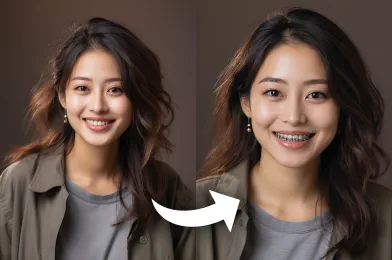
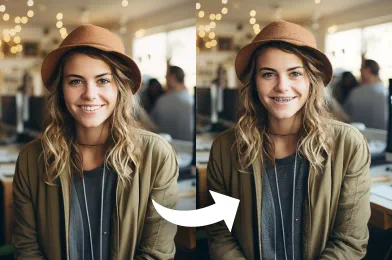
See yourself with braces photo instantly using our AI Braces Filter. It's free, accurate, and get realistic results in seconds.
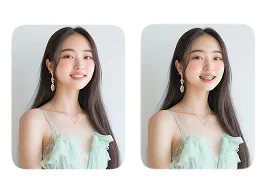
Select Original Image
Drag & Drop your file here
Jpg / Png / Webp images allowed
Or select a sample image





What Amazing Results to Expect
How to Use AI Braces Filter?
Follow these simple steps to add a braces effect to your photos using AI.
Upload Image
Choose a portrait photo from your gallery where your teeth are visible.
Apply Image Effect
Our AI technology will automatically detect the smile and overlay a realistic braces filter.
Download & Share
Save the edited image to your device or share it on your social media profiles.
Why Users Love Our AI Braces Filter
Free Braces Try-On
Get an instant, realistic preview of how braces would look on your smile—no dentist visit, consultation, or cost involved.
Fun & Easy to Use
Simply upload your photo and let the AI do the work. No editing skills or app downloads needed for a quick and effortless braces try-on.
Realistic Smile Simulation
Experience a lifelike braces effect that blends naturally with your teeth, giving you a true-to-look preview of your future smile.
No Sign-Up Required
Try the braces filter instantly. With Faceswapper AI, no account or registration is needed to apply the braces transformation.
Best Practices for Quality Results
Front-Facing Photo for Accurate Braces Placement
Use a straight, front-facing selfie so the AI can clearly detect your teeth and apply the braces in the correct position. This ensures a more natural and precise result.
Natural Smile for Realistic Results
Show a gentle, natural smile with your teeth visible. This helps the AI understand your tooth structure, making the braces effect look more realistic and well-aligned.
Keep Your Smile Free of Obstructions
Make sure nothing covers your mouth—no hands, hair, or accessories blocking your teeth. A clear smile helps the AI place the braces cleanly and accurately.
Discover Other Popular Image Effects

FAQs About AI Braces Filter

All Copyright reserved @ 2025 FaceSwapper