Add Mustache To Photo
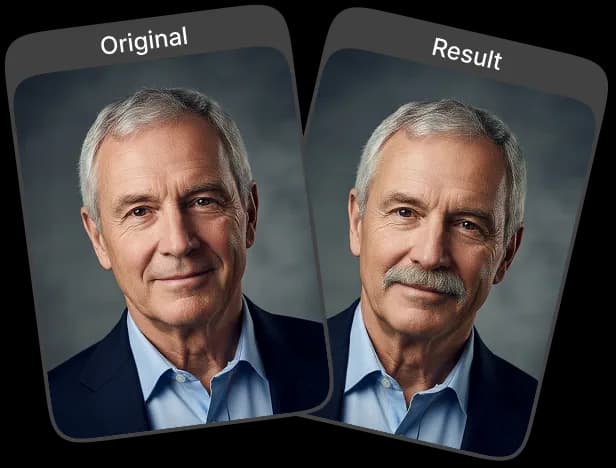
Our AI tool add mustache to photo lets you try different mustache styles with a single click. It quickly adds a natural-looking mustache to your photo.
Upload Original Image
or drag and drop PNG, JPG or WEBP
Sample Images





What Amazing Results to Expect


How to Add a Mustache to Your Photo?
Add a realistic mustache to your photo in just a few simple steps.
Upload Your Photo
Choose a clear, front-facing photo from your device. For best results, use a well-lit image with your face fully visible.
Apply the Mustache Effect
Click on the “Apply Image Effect” button. Our AI will automatically detect your face and add a natural, realistic mustache style to your photo.
Download & Share
Once the mustache is applied, download the final image to your device and share it anywhere you like.
Key Benefits You’ll Experience
High-Quality Output
Enjoy crisp, detailed, and realistic results as the AI seamlessly blends the mustache into your photo for a polished finish.
Fast and Effortless
Our AI automatically analyzes your face and adds the mustache instantly, giving you high-quality results without any manual adjustments.
Realistic Styles
Get natural, lifelike mustache designs that blend smoothly with your facial features, giving your photo an authentic look without any visible edits or harsh lines.
No Skills Needed
Anyone can generate a quality result with just a single upload and click, making it simple for beginners and effortless for experienced editors who want quick, professional-quality results.
How to Get the Best Results

Use a Clear, Front-Facing Photo
Make sure your face is fully visible and centered so the AI can accurately detect your features.

Avoid Shadows on the Upper Lip
Shadows or uneven lighting in the mustache area can reduce realism, so aim for a clean, evenly lit face.

Use Higher Resolution Images
Uploading a sharp, high-quality photo allows the AI to detect details better and produce a more realistic mustache.
Check Out Other Trending Image Effects



Frequently Asked Questions
 FaceSwapper
Ship faster with reliable pipelines, actionable insights, and enterprise‑grade controls - all in one platform.
All Copyright reserved @ 2026 FaceSwapper