Remove Tattoos From Photo
Easily remove tattoos from photos with our AI tool. Achieve clean, natural-looking results instantly and edit your images with precision.
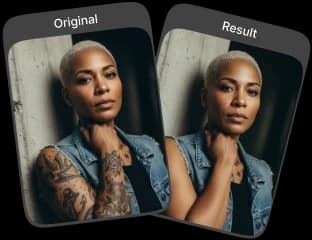
Upload Original Image
or drag and drop PNG, JPG or WEBP
Sample Images





Before & After Transformations
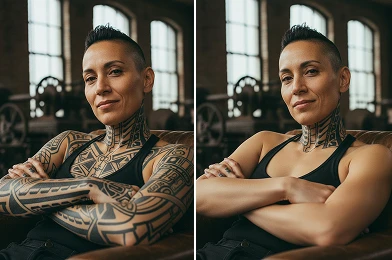
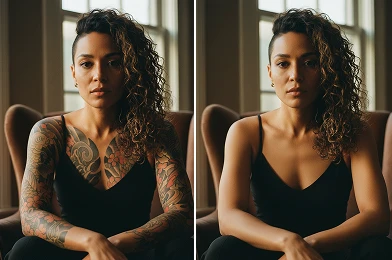
How to Remove a Tattoo from Your Photo
Easily remove unwanted tattoos from your photos in just a few simple steps.
Choose Your Photo
Pick the image you want to edit and upload it to the tool.
Remove the Tattoo
The tool quickly detects and removes the tattoo, leaving your photo clean and natural.
Save or Share
Download the tattoo-free image or share it directly from the platform.
Why Users Love It
Simple and User-Friendly
No technical skills required. The process to remove tattoos from photos is intuitive and guided, delivering clean results effortlessly.
Safe and Non-Destructive
Your original image stays intact. The tool edits a copy so you can experiment freely without risking the original photo.
Enhance Professional Photos
Create polished, professional-looking images by removing tattoos. Perfect for headshots, resumes, or any formal context, giving you full control over your final look.
Visualize a New Look
Curious how your photos would look without a tattoo? Use the remove tattoo from photo tool to explore different styles for social media or personal use.
Professional Advice to Remove Tattoo From Photo

Start With a High Quality Image
For a clean outcome, use a clear, well lit photo. Higher resolution helps the process to better remove tattoo from photo.

Avoid Over-Blurring
Keep skin details intact; over-blurring can look unnatural.

Consider the Background
Photos with simple backgrounds produce great results. Complex patterns nearby may affect how you remove tattoo from photo.
Check Out Other Trending Image Effects



FAQs About Remove Tattoo From Photo
 FaceSwapper
Ship faster with reliable pipelines, actionable insights, and enterprise‑grade controls - all in one platform.
All Copyright reserved @ 2026 FaceSwapper