Remove Wrinkles From Photo with AI
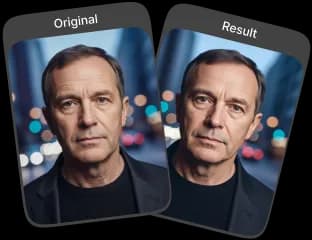
Remove wrinkles from photo using advanced AI technology. Achieve smoother skin with natural-looking results that retain facial details and clarity.
Upload Original Image
or drag and drop PNG, JPG or WEBP
Sample Images





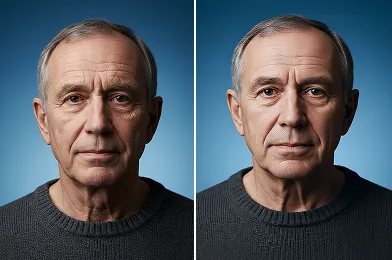
Some Real Examples of Amazing Results

How to Use Remove Wrinkles From Photo with AI?
This section explains the basic steps to reduce wrinkles using AI technology.
Upload Image
Upload the photo you want to edit so the AI can prepare it for wrinkle removal.
Apply Photo Effect
Click apply to allow the AI to analyze the image and smooth visible wrinkles automatically.
Download & Share
After processing, download the improved photo or save and share it for future use.
What Makes This Tool Great
Natural Results with Preserved Image Quality
The AI smooths wrinkles while preserving natural skin texture and facial expression, ensuring your photo looks refreshed, realistic, and never overedited.
Simple and Effortless Editing Process
Designed for ease of use, the tool requires no editing skills and lets you remove wrinkles quickly through a clear and intuitive process.
Enhance Important and Personal Photos
Refine portraits that matter, from family memories to professional headshots, creating polished images suitable for profiles, prints, or special moments.
Consistent Performance Across Photos
The AI produces reliable wrinkle reduction across close-ups and group photos, delivering balanced, clear, and consistent results every time.
Achieve Natural Looking Results

Start With A High Quality Image
Use a clear, well lit photo for better results. High quality images help to remove wrinkles from photo with more precision.

Zoom In For Detail
For a more natural look, zoom in on the specific areas. This helps you to remove wrinkles from photo with greater control.

Aim For A Natural Appearance
The goal is to soften lines, not erase them entirely. This makes the effort to remove wrinkles from photo appear more authentic.
Related Popular Image Effects



Frequently Asked Questions
 FaceSwapper
Ship faster with reliable pipelines, actionable insights, and enterprise‑grade controls - all in one platform.
All Copyright reserved @ 2026 FaceSwapper